Wi-Fi 5 vs Wi-Fi 6 vs Wi-Fi 7: The Ultimate 2026 Guide to Upgrading Your Home Network
Meta Description: Confused by Wi-Fi 5 vs Wi-Fi 6 vs Wi-Fi 7? Our expert guide breaks down speed, latency, features, and capacity to help you decide if it’s time to upgrade.
In today’s hyper-connected world, your Wi-Fi network is the unsung hero of your home. It’s the invisible backbone that powers everything from your 4K movie night and competitive online gaming to your smart thermostat and video doorbell. But just like any technology, Wi-Fi is constantly evolving. You’ve likely seen the labels on routers and devices: Wi-Fi 5, Wi-Fi 6, and now the powerhouse newcomer, Wi-Fi 7. But what do these numbers actually mean for your daily life? Is the latest and greatest always necessary, or is your current setup “good enough”?
As specialists in low-voltage contracting and custom home network installations, including solutions for [Link to your Starlink installation services page] and residential cellular boosters, we get these questions every day. The jargon can be overwhelming, but understanding the core differences is crucial to building a network that doesn’t just work, but excels. This comprehensive guide will demystify the differences between Wi-Fi 5, 6, and 7. We’ll break down the technical leaps, translate them into real-world benefits, and provide an actionable Wi-Fi 7 router upgrade guide so you can make an informed decision for your home.
A Quick Primer: Understanding Wi-Fi Generations
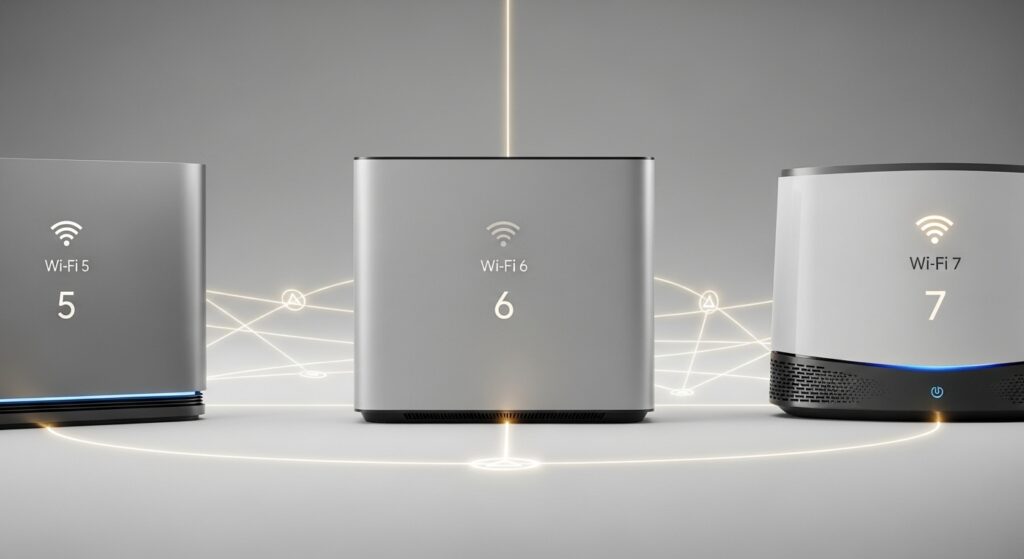
Before we dive into the specifics of the Wi-Fi standards comparison, let’s clarify the naming. For years, Wi-Fi standards were known by their technical IEEE designation, like “802.11ac”. To make things simpler for consumers, the Wi-Fi Alliance introduced a generational naming system. It’s much easier to remember and understand:
- Wi-Fi 5 is 802.11ac (released in 2014)
- Wi-Fi 6 is 802.11ax (released in 2019)
- Wi-Fi 7 is 802.11be (released in 2024)
Each new generation represents a significant leap forward in technology, designed not just for more speed, but for handling the ever-increasing number of connected devices in the modern home. Now, let’s explore each generation in detail.
Wi-Fi 5 (802.11ac): The Long-Reigning Champion
For nearly a decade, Wi-Fi 5 has been the gold standard for home networks. If you bought a router, laptop, or smartphone between 2014 and 2020, it almost certainly uses this technology. It was a massive improvement over its predecessor (Wi-Fi 4), introducing faster speeds and better performance, primarily on the 5 GHz band.
Key Features of Wi-Fi 5:
- Primary Band: 5 GHz. While many Wi-Fi 5 routers are “dual-band” and also support the older 2.4 GHz band, all of its advanced features operate exclusively on the less-congested 5 GHz frequency.
- Max Theoretical Speed: Around 3.5 Gbps. In the real world, you’d be lucky to see speeds approaching 1 Gbps on a single device.
- Channel Width: Up to 80 MHz (with an optional 160 MHz capability that was rarely implemented effectively). Think of channel width as the number of lanes on a highway; wider channels allow more data to flow at once.
- Key Technology (MU-MIMO): Wi-Fi 5 introduced Multi-User, Multiple Input, Multiple Output (MU-MIMO). This allowed a router to communicate with multiple devices simultaneously (up to four), but only for downloads. It was a step forward, but limited.
The Limitations of Wi-Fi 5 Today:
While still capable for many households, Wi-Fi 5 begins to show its age in a dense device environment. Its “one-at-a-time” approach to handling most traffic can lead to network congestion, buffering, and lag when multiple family members are all streaming, gaming, and working from home. It was designed for a world with fewer smart devices, and the strain is beginning to show.
Wi-Fi 6 (802.11ax): The Efficiency Revolution
Wi-Fi 6 wasn’t just about making one device go faster; it was about making an entire network of devices run better, all at the same time. It tackled the problem of congestion head-on, borrowing technology from the cellular world to create a more efficient and responsive network. This is where the Wi-Fi 5 vs Wi-Fi 6 speed and efficiency debate becomes critical.
Game-Changing Features of Wi-Fi 6:
- OFDMA (Orthogonal Frequency Division Multiple Access): This is the star of the show. Imagine a delivery truck (your Wi-Fi signal) making one stop per house (device). That’s Wi-Fi 5. With OFDMA, that same truck can carry packages for multiple houses and drop them all off in a single trip. It divides a Wi-Fi channel into smaller sub-channels, allowing the router to serve many devices simultaneously with small packets of data. This dramatically reduces latency and improves efficiency, especially for IoT and smart home devices.
- Improved MU-MIMO: Wi-Fi 6 enhanced MU-MIMO to work with up to eight devices simultaneously, and importantly, it works for both uploads and downloads. This is a big win for video calls, uploading files, and live streaming.
- 1024-QAM: Quadrature Amplitude Modulation (QAM) determines how much data can be packed into a signal. By moving from 256-QAM in Wi-Fi 5 to 1024-QAM, Wi-Fi 6 can cram 25% more data into each transmission, resulting in higher raw speeds.
- Target Wake Time (TWT): This feature allows the router to schedule check-in times with devices. For battery-powered gadgets like smart sensors or cameras, this is revolutionary. Instead of constantly staying awake to listen for a signal, they can “sleep” and conserve power, waking only at their scheduled time. This can lead to a massive increase in battery life.
The Real-World Impact of Wi-Fi 6:
For a family with dozens of connected devices—laptops, phones, smart TVs, security cameras, speakers, lights—Wi-Fi 6 provides a noticeably smoother experience. It’s less about a single speed test number and more about the network’s overall stability and responsiveness under load. It’s the standard built for the modern smart home.
Wi-Fi 7 (802.11be): Extremely High Throughput
If Wi-Fi 6 was about efficiency, Wi-Fi 7 is about unleashing unprecedented speed, capacity, and reliability. Officially dubbed “Extremely High Throughput,” Wi-Fi 7 takes the solid foundation of Wi-Fi 6 and supercharges it with next-generation technologies. This is where the Wi-Fi 7 vs Wi-Fi 6 comparison reveals a monumental leap forward, moving beyond incremental improvements to a fundamental change in how wireless data is transmitted.
What New Technologies Does Wi-Fi 7 Introduce Compared to Wi-Fi 6?
The Wi-Fi 7 advantages over Wi-Fi 6 are significant, driven by a trio of groundbreaking features. Understanding these is key to grasping its potential.
1. 320 MHz Ultra-Wide Channels
Wi-Fi 7 doubles the maximum channel width from 160 MHz (in Wi-Fi 6) to a massive 320 MHz. Returning to our highway analogy, this is like doubling the number of lanes from eight to sixteen. This instantly doubles the theoretical top speed for a connected device, making it possible to achieve multi-gigabit wireless speeds. This is especially impactful for users with multi-gig internet plans, such as those with high-end fiber or a high-performance [Link to our article on optimizing Starlink] setup.
2. 4K-QAM (4096-QAM)
Just as Wi-Fi 6 improved on Wi-Fi 5’s data density, Wi-Fi 7 takes it a step further. By upgrading from 1024-QAM to 4096-QAM, it packs 20% more data into every signal transmission. When combined with 320 MHz channels, this pushes the theoretical speeds into astonishing territory—up to 46 Gbps, though real-world speeds will be lower but still multiple times faster than Wi-Fi 6.
3. Multi-Link Operation (MLO)
This is arguably the most revolutionary of all Wi-Fi 7 features. Historically, your device could only connect to your router on one band at a time (either 2.4 GHz, 5 GHz, or 6 GHz). MLO changes everything. It allows a single device to establish and maintain simultaneous connections across multiple bands.
Imagine your phone is streaming a 4K movie. With MLO, it can download data from both the 5 GHz and 6 GHz bands *at the same time*. This has two profound benefits:
- Increased Throughput: By aggregating the bandwidth of two or more bands, you get significantly faster speeds.
- Lower Latency and Higher Reliability: If one band experiences interference (e.g., your neighbor’s microwave disrupts the 2.4 GHz band), your connection doesn’t drop. The data simply continues to flow seamlessly over the other active band(s). This creates a rock-solid, ultra-low-latency connection perfect for Wi-Fi 7 for gaming, streaming, and smart home applications, as well as AR/VR and other real-time uses.
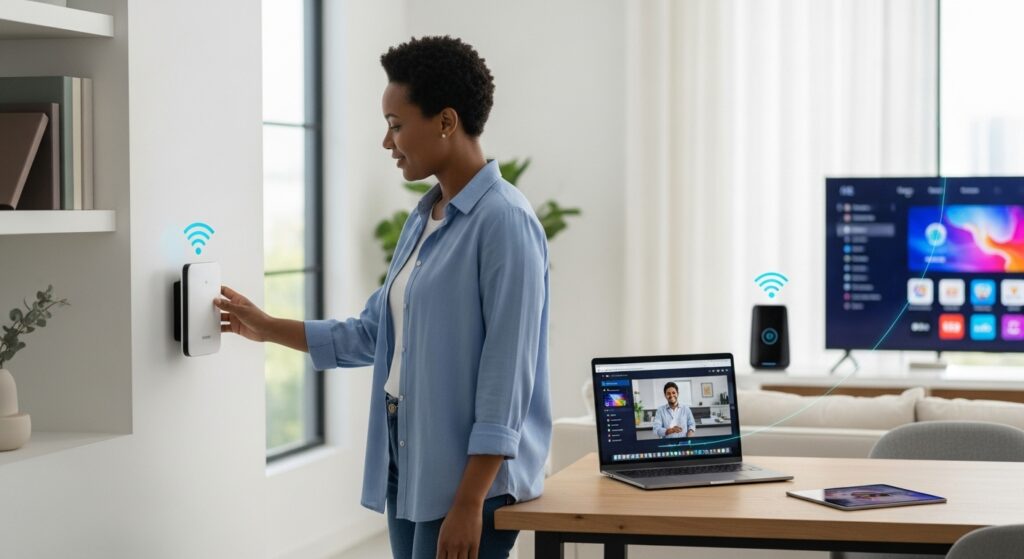
Head-to-Head: Wi-Fi 5 vs Wi-Fi 6 vs Wi-Fi 7 Speed Latency Capacity Comparison
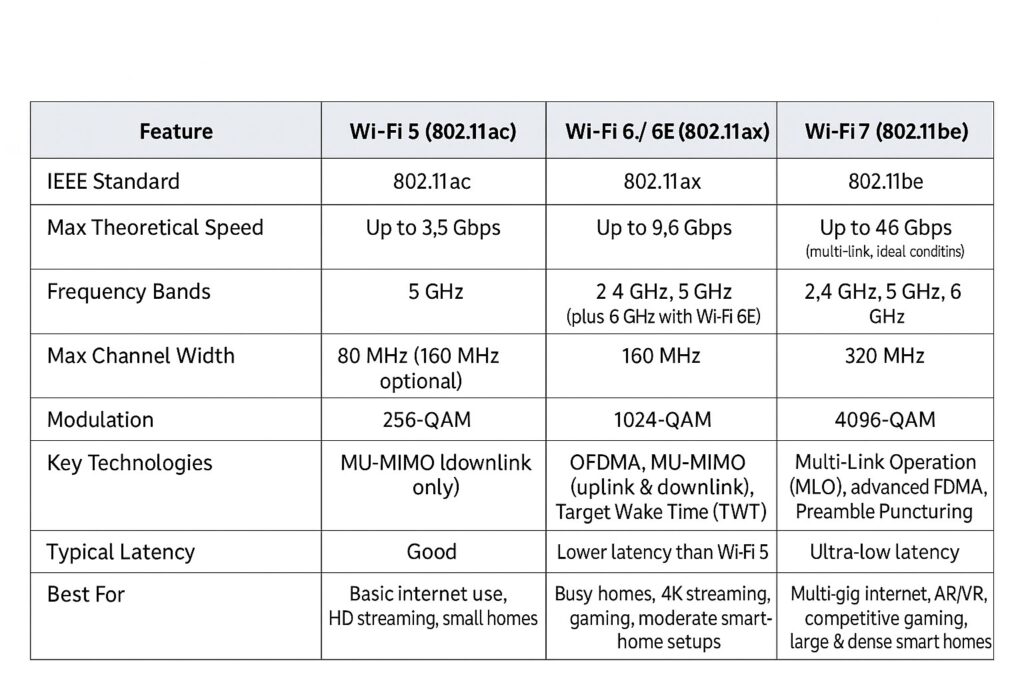
To make the differences between Wi-Fi 5, 6, and 7 crystal clear, here’s a direct comparison table:
Answering Your Top Questions: Is Wi-Fi 7 Worth It?
Now that we understand the technology, let’s tackle the practical questions that homeowners are asking.
What are the main differences in speed and performance?
The jump from Wi-Fi 5 to Wi-Fi 6 was primarily about improving efficiency and performance in crowded networks. While top speeds increased, the main benefit was a smoother experience for everyone. The jump from Wi-Fi 6 to Wi-Fi 7 is about a raw, explosive increase in speed and a massive reduction in latency. Thanks to MLO and 320 MHz channels, Wi-Fi 7 can deliver multi-gigabit speeds wirelessly and provide near-wired Ethernet levels of reliability, something previous generations could not promise.
Is Wi-Fi 7 worth upgrading to from Wi-Fi 6 or Wi-Fi 5?
This is the central question. The answer depends entirely on your specific situation.
- Upgrading from Wi-Fi 5: Yes, a jump to at least Wi-Fi 6 is highly recommended, and jumping straight to Wi-Fi 7 is a fantastic way to future-proof your home. If your network struggles when multiple people are online, or you have more than 20-25 connected devices, you will see a dramatic improvement in stability and speed with a newer standard.
- Upgrading from Wi-Fi 6: The decision is more nuanced. If you have a gigabit or multi-gigabit internet plan, are a serious competitive gamer, an early adopter of AR/VR, or transfer massive files wirelessly between devices on your local network, then Wi-Fi 7 is absolutely worth it. For the average user who is happy with their Wi-Fi 6 performance, it may not be an essential upgrade *today*, but it will be in the near future.
When should I consider upgrading to a Wi-Fi 7 router?
You should strongly consider a Wi-Fi 7 router upgrade if you meet any of these criteria:
- You’ve upgraded your internet plan to over 1 Gbps. A Wi-Fi 5 or even some Wi-Fi 6 routers can become a bottleneck, preventing you from getting the speeds you’re paying for wirelessly.
- You’re building a new home or doing a major renovation. Installing the latest networking technology now saves you from needing to upgrade again in a few years. It’s a core part of a modern home infrastructure. Consider a professional installation for optimal placement and performance. [Link to your network installation services].
- You are a “power user.” This includes competitive online gamers who need the lowest possible latency, content creators who move huge video files, and tech enthusiasts using cutting-edge devices like AR/VR headsets.
- Your current network is struggling. If you experience constant buffering, lag spikes, and dropped connections, a Wi-Fi 7 system will provide a more robust and reliable foundation.
Does Wi-Fi 7 offer better range or coverage?
This is a common misconception. A new Wi-Fi standard itself doesn’t inherently increase range. The transmission power of routers is limited by regulations (like the FCC in the US). However, Wi-Fi 7 can *improve effective range and performance at a distance*. Features like MLO allow a device at the edge of the 6 GHz signal to seamlessly use the more robust 5 GHz signal simultaneously, creating a more stable and faster connection at a distance than a single-band connection would be. For truly large homes or properties with challenging layouts, a professionally installed mesh system or a [Link to a blog post about mesh networks vs extenders] is still the best solution for complete coverage.
Are Wi-Fi 7 devices backward compatible with older Wi-Fi standards?
Absolutely. Wi-Fi 7 backward compatibility is a core part of its design. A new Wi-Fi 7 router will work perfectly with all your existing Wi-Fi 6, Wi-Fi 5, and even Wi-Fi 4 devices. Similarly, a new Wi-Fi 7 smartphone will be able to connect to any older Wi-Fi network. You simply won’t get the benefits of the new standard until both the router (access point) and the device (client) support Wi-Fi 7.

A Practical Wi-Fi Router Upgrade Guide for Homeowners
Feeling ready to make a choice? Here’s a step-by-step guide to deciding on your next upgrade.
Step 1: Assess Your Internet Speed
Run a speed test (like Ookla) while connected directly to your modem with an Ethernet cable. This tells you the maximum speed coming into your house. If you’re paying for 1 Gbps but only getting 300 Mbps over Wi-Fi, your router is likely the bottleneck. If you have a multi-gig plan (2 Gbps or higher), a Wi-Fi 7 router is essential to take full advantage of it.
Step 2: Count Your Devices
Make a list of every single device that connects to your Wi-Fi. Don’t forget the “invisible” ones: smart plugs, light bulbs, thermostat, doorbell, security cameras, smart speakers, etc.
- Fewer than 25 devices: Wi-Fi 5 might still be adequate, but Wi-Fi 6 would offer a noticeable stability improvement.
- 25-50 devices: Wi-Fi 6 is the sweet spot. You’ll benefit from its efficiency features.
- 50+ devices or high-bandwidth devices: Wi-Fi 7 is the best choice to manage this level of network demand without compromising performance for anyone.
Step 3: Analyze Your Usage
What do you actually *do* on your network?
- Basic Browsing & Streaming: Wi-Fi 5 or Wi-Fi 6 is plenty.
- 4K/8K Streaming & Multiple Users: Wi-Fi 6 is a solid choice.
- Competitive Online Gaming & VR/AR: Wi-Fi 7’s ultra-low latency via MLO is a true game-changer.
- Working from Home with Large Files & HD Video Calls: Wi-Fi 6 is good, but Wi-Fi 7 offers superior reliability and speed for these critical tasks.
Step 4: Consider Your Future Needs
Buying a router is an investment that should last 3-5 years. Think about what devices you might add in that time. Will you get a VR headset? Add more smart home security? Upgrade to an 8K TV? Choosing Wi-Fi 7 today is the best way to future-proof your network for the technologies of tomorrow, ensuring you won’t need to upgrade again in just a couple of years. For more information on future-proofing your home network, consult the [Link to the official Wi-Fi Alliance website].
Conclusion: The Future is Fast, and It’s Wireless
The evolution from Wi-Fi 5 to Wi-Fi 6 to Wi-Fi 7 isn’t just a story of numbers on a box; it’s a reflection of how our lives have become inextricably linked with the digital world.
Wi-Fi 5 was the reliable standard that brought fast HD streaming into our homes. Wi-Fi 6 was the smart upgrade that tamed the chaos of the modern smart home, making sure every device got its fair share of the signal. And now, Wi-Fi 7 has arrived as the powerhouse, built for an era of multi-gigabit internet, immersive virtual realities, and instantaneous, lag-free experiences.
Whether you’re looking to eliminate buffering on movie night, gain a competitive edge in your favorite game, or build a robust network that can handle whatever the future throws at it, understanding these differences is the first step. The right choice will transform your home network from a utility into a seamless and powerful asset.
If you’re ready to experience the next generation of wireless performance or have questions about designing the perfect network for your home, don’t hesitate to reach out. [Contact us today for a professional home network consultation!]
For a deeper technical breakdown of each standard, check out this detailed Wi-Fi 5 vs Wi-Fi 6 vs Wi-Fi 7 comparison